About the project
Starting from TrueNAS 24.10.10, the sendemail builtin function is no longer available (removed for security reason).
The
This standalone script provides the ability to send emails and attachments using the TrueNAS native
Originally designed to be a wrapper for Joe's Multi Report, it also can be used to simplify sending email overall in many other scenarios.
The
mail.send method is still available, but is quite trivial to use due to some payload limitations/encoding/ecc.This standalone script provides the ability to send emails and attachments using the TrueNAS native
mail.config, in the simplest possible way, without giving up on some more advanced features that are not natively available.Originally designed to be a wrapper for Joe's Multi Report, it also can be used to simplify sending email overall in many other scenarios.
Actually, there are basically 2 different usage methods:
- Passing
--subject,--to_address,--mail_body_html(either a file path and plain text), plus other optionally args explained belove. - Passing only the full email base64 encoded (either a file path and plain text) as
--mail_bulk, trying to emulating the old sendemail function, and all the info will be retrieved there.
- Truenas Scale stable train (nightly, alpha, beta, ... are not officially supported)
- Truenas Core is also supported, with some minor limitation
- Working internet connection
- Working email settings in Truenas (System ➜ General Settings ➜ Email)
- Context usage user with at least
READONLY_ADMINorSHARING_ADMINroles - Context usage user with enough permissions on the execution folder
- The script should reside in a secured dataset/folder
To retrieve TN mail configuration data, at least
So is highly advised to only use the script in a secured folder, not accessible to un-priviliged users, to avoid unexpected behaviour.
The script will advise you in those scenarios, so pay attention if some warning are raised on first usage and fix your dataset permission accordingly.
There are other checks performed to improve security (attachment black list, avoiding symlink, CRLF injection, ...), any suggestiona are welcome and i will do my best to keep things as safe and flexible for everyone.
READONLY_ADMIN or SHARING_ADMIN roles are needed for the user running the script.So is highly advised to only use the script in a secured folder, not accessible to un-priviliged users, to avoid unexpected behaviour.
The script will advise you in those scenarios, so pay attention if some warning are raised on first usage and fix your dataset permission accordingly.
There are other checks performed to improve security (attachment black list, avoiding symlink, CRLF injection, ...), any suggestiona are welcome and i will do my best to keep things as safe and flexible for everyone.
Advanced usage methods
Is possible to override the default TN sender name - sender email to fit more scenarios in those ways:
If sendemail and
Also to mention, only
Customize the sender name has no particoular restrictions, is pretty safe, instead you have to pay attention on customizing the sender (reject ratio depending on your provider):
-
using directly
--override_fromemailor--override_fromnameargs calling the script -
for multi report users, editing own standard
mr_config file, value involved areFromNameandFrom, as a fallback
override data > fallback data > default If sendemail and
mr_config file are in the same folder, fallback values will be still retrieved although you will call the script outside the multi_report.Also to mention, only
override_fromname and FromName can be used, without an email override, and they will be applied to the default TN email.Customize the sender name has no particoular restrictions, is pretty safe, instead you have to pay attention on customizing the sender (reject ratio depending on your provider):
 GMAIL: this provider will override your sender with the account email if it is not a validated alias, and the deliver shouldn't fail; you can safely send email with a sender plus address (example, your account is myemail@gmail.com and you use myemail+multireport@gmail.com as sender)
  OUTLOOK: every sender that is not a valid alias of the account will be rejected
  SMTP: every provider has own policy, but the most reject sender that is not a validated account/alias; also to mention, despite the email is send, using a sender with a different domain can be checked as spoofing with the direct conseguence that the email is delivered but go into the SPAM folder
In case of need, passing
Folder itself and files can be safely deleted manually anytime the script is not running.
Calling the script from crontab, with the debug enabled, can lead to problem if the root user is the one used and, before invoke the script, the correct working directory is not selected with a
Log files not obviously expose credentials or access token, but don't forget to cleanup after a debug session anyway to not expose more-or-less sensitive data in your usage context arising from exceptions.
--debug_enabled as arg to the script will activate the debug mode: a log file will be generated and placed into sendemail_log folder. Folder itself and files can be safely deleted manually anytime the script is not running.
Calling the script from crontab, with the debug enabled, can lead to problem if the root user is the one used and, before invoke the script, the correct working directory is not selected with a
cd command.Log files not obviously expose credentials or access token, but don't forget to cleanup after a debug session anyway to not expose more-or-less sensitive data in your usage context arising from exceptions.
If you wanna just test the basic function fast and quickly, use the
In test mode, every arg will be overwritten, also the debug will be enabled automatically. If the script is in the same Multi Report folder, the fallback from the multi_report_config.txt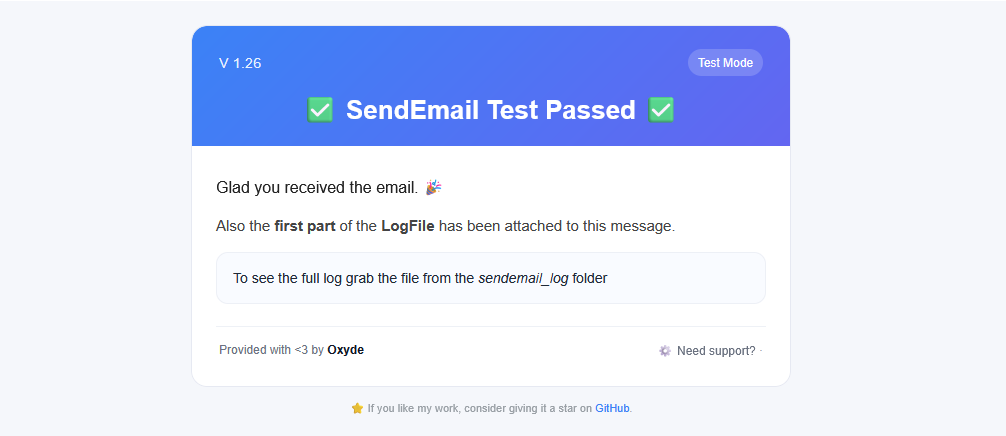
--test_mode and the script will compose and send a test email to the actual user email address.In test mode, every arg will be overwritten, also the debug will be enabled automatically. If the script is in the same Multi Report folder, the fallback from the multi_report_config.txt
FromName and From will be used, so you can ensure that the fallbacks are working properly.
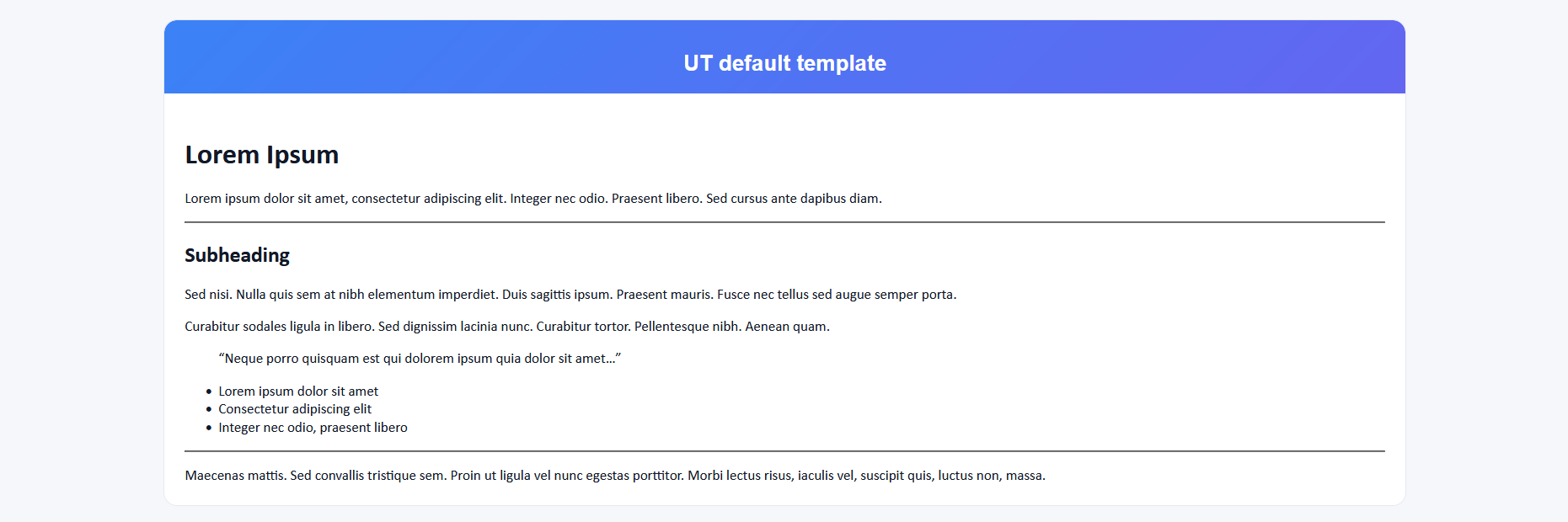
Prebuilt templates are a collection of email templates that allow user to fast "beautify" theyr email (with a nod to responsive design).
They are also used for internal message like test email, update notification, ecc (but those are reserved, and can't be selected).
Usage is pretty simple:
They are also used for internal message like test email, update notification, ecc (but those are reserved, and can't be selected).
Usage is pretty simple:
- choose the template that fit your need from the preview list above (click the image for a bigger view)
- grab the code and use it in the
--use_templatearg calling the script - some templates, to work properly, will need a set of dynamic fields as json object in the
--template_vararg. - attribute usage convention used is
*element*colforcolor,*element*bkcolforbackground-color,*element*contentfor inner text,*element*widthforwidth
| Preview | Code | Notes |
|---|---|---|
|
UT_default |
Generic basic wrapper for subject (used in the header) and content (used in the body container). No dynamic fields are used/required, this is the best template to receive a responsive email without do anything fancy --use_template "UT_default"
|
|
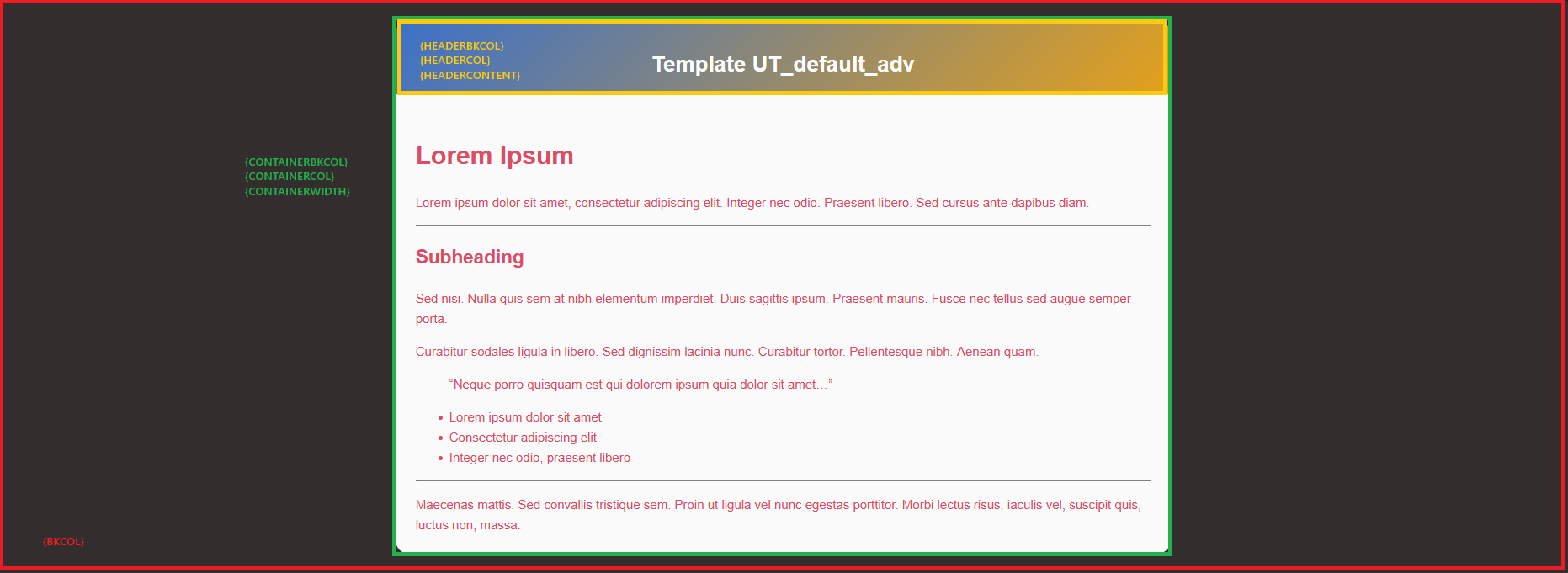
UT_default_adv |
Generic basic wrapper for subject and content, but with the possibility to customize style and header content. Some additional arguments are required as mapped belove:
--use_template "UT_default_adv"
                                  --template_var '{"bkcol": "#332D2D", "containerbkcol": "#FBFBFB", "containerwidth": "50%", "headerbkcol": "#3B71CA,#E4A11B", "containercol": "#DC4C64", "headercol": "#FFFFFF", "headercontent": "Template UT_default_adv"}'
|

|
ut_table_4col |
Generic basic wrapper to build a dynamic 4 column table, with subject on top and html_content on bottom. Access the col name with col1 col2 col3 col4, and iterate every line with an array named containers
--use_template "ut_table_4col"
                                  --template_var '{"col1": "col1 name", "col2": "col2 name", "col3": "col3 name", "col4": "col4 name", "containers": [ {"col1": "col1 value", "col2": "col2 value", "col3": "col3 value", "col4": "col4 value"}, {"col1": "col1 value", "col2": "col2 value", "col3": "col3 value", "col4": "col4 value"}, ... ]}'
|
|
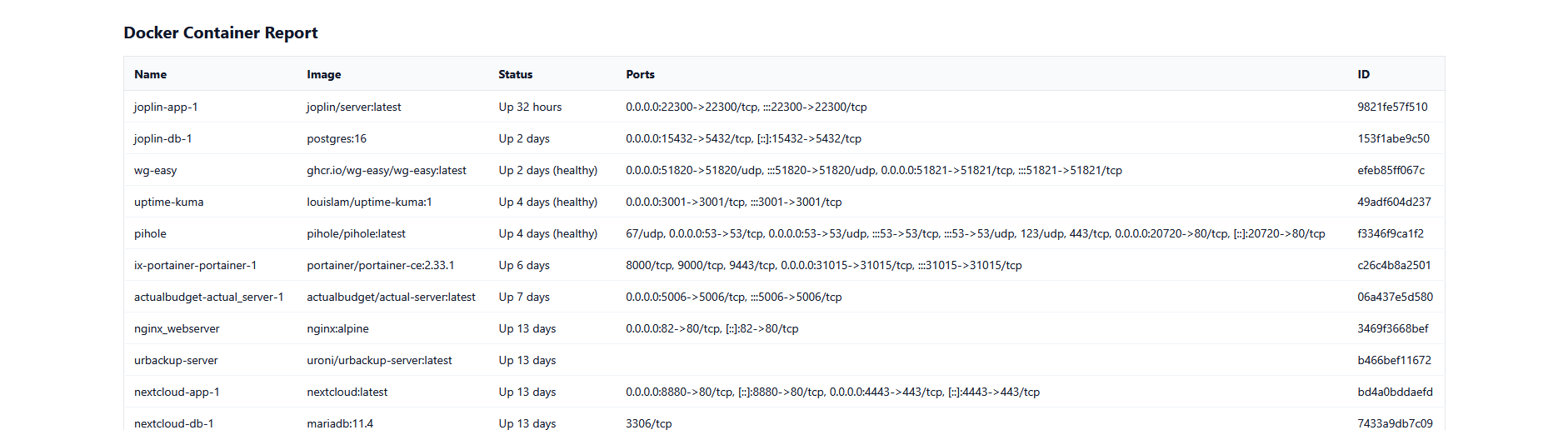
ut_table_5col |
Generic basic wrapper to build a dynamic 5 column table, with subject on top and html_content on bottom. Access the col name with col1 col2 col3 col4 col5, and iterate every line with an array named containers
--use_template "ut_table_5col"
                                  --template_var '{"col1": "col1 name", "col2": "col2 name", "col3": "col3 name", "col4": "col4 name", "col5": "col5 name", "containers": [ {"col1": "col1 value", "col2": "col2 value", "col3": "col3 value", "col4": "col4 value", "col5": "col5 value"}, ... ]}'
|
Advanced users can build theyr own custom templates following this steps:
- create a file in the same sendemail execution folder
- fill up every dynamic fields you need with this sintax:
{myfieldname} - email subject is available as
{subject}, and the html body as{html_content} - be careful on escape single bracket on other part of the code: they must be escaped with a double bracket, example:
.myclass { color: black;} ...must be.myclass {{ color: black;}} ..., otherwhise the template will not be applied correctly - pass
--use_template "myfile.html"and--template_vararg with all the dynamic fields you have created in the template{"myfieldname": "myvalue" ...}
python3 sendemail.py --use_template "myfile.html" --template_var '{"myfieldname": "myvalue", ...}' ...[myfield]
--template_var is also capable to handle array of json object, for example
{"myfieldname": "myvalue", "myarray": [ {"a_var1": "a_var1_value", "a_var2": "a_var2_value"}, {...}] ...}<!-- #for var in myarray --> <li>{var[a_var1]} — {var[a_var2]}</li> <!-- #endfor --> Note that myarray must coincide with the name of the array to work, and same for the json object property!
Names are totally customizable, just respect the "html comment convention"!
This trick will be very helpful to build dynamic table easily and fast: use all the array you want, but only one iteration will for once will be applied, nested json arrays are not supported.
The script is capable to handle attachments: just pass a list of file path to the arg
From version 1.80, is also capable to send a single .zip containing your files enabling the arg
Take care:
--attachment_filesFrom version 1.80, is also capable to send a single .zip containing your files enabling the arg
--zip_attachments.Take care:
- every single file can't exceed 50mb
- the total attachments size can't exceed 50mb
- you cannot attach symlink files
- you cannot attach certain blacklisted file
DENYLIST_PREFIXES = [
    "/etc/ssh/",
    "/root/.ssh/",
]

DENYLIST_FILES = [
    "/etc/passwd",
    "/etc/shadow",
    "/etc/hosts",
    "/root/.bash_history",
    "/var/log/auth.log",
    "/var/log/messages",
    "/var/log/secure",
    "/etc/sudoers",
    "/etc/fstab",
]
- many providers can reject your email if contains certain file extension (eg .html, .json, .tar ecc)
- many providers can reject your email if attachments size exceed theyr arbitrary quota
Managing updates
From version 1.50, the sendemail has been equipped with several tools, that will help both end users and other scripts (that rely on sendemail) keep everything updated.
These tools aim to ensure to keep things easy in different scenarios, providing notifications, outputs (that can be parsed), and an internal auto-update mechanism.
These tools aim to ensure to keep things easy in different scenarios, providing notifications, outputs (that can be parsed), and an internal auto-update mechanism.
With
This arg is intended to be used alone in a TrueNAS cronjob, with a "slow" schedule (e.g. weekly, since it has no queue management) to help keep the script manually updated.
--notify_update the script uses the TrueNAS builtin mail.send command to notify that a new version has been released.This arg is intended to be used alone in a TrueNAS cronjob, with a "slow" schedule (e.g. weekly, since it has no queue management) to help keep the script manually updated.
With
This arg is intended to be used alone.
--check_update the script returns a tiny json object that other scripts can use to decide whether to perform or notify about an available update.This arg is intended to be used alone.
{"version": "1.**", "latest_version": "1.**", "need_update": false}
With
This arg can be used with
Also to mention, everytime the
--self_update the script will perform an auto update, only if a new stable version is available on Github.This arg can be used with
--notify_self_update, and the script will generate a notification using the TrueNAS builtin mail.send command, whether it a success or fail.Also to mention, everytime the
--self_update is used, also the debug mode can be used!
Usage example
#!/bin/bash
python3 sendemail.py --test_mode #!/bin/bash
subject='test'
recipient='myemail@gmail.com'
# Email Body: can be an HTML file path or plain text/html
html_file="<h1>Send Email Test</h1><p>Hello World!</p>"
# Attachments (optional): add file paths
attachment=()
attachment+=("path/to/first/attachment") # Replace with the actual path
#attachment+=("path/to/second/attachment") # Add additional files as needed
python3 sendemail.py \
--subject "$subject" \
--to_address "$recipient" \
--mail_body_html "$html_file" \
--attachment_files "${attachment[@]}" #!/bin/bash
mail_bulk= '/path/to/base64encode/email'
python3 sendemail.py --mail_bulk "$mail_bulk" #!/bin/bash
subject='test'
recipient='myemail@gmail.com'
html_file="<h1>Send Email Test</h1><p>Hello World!</p>"
python3 sendemail.py \
--subject "$subject" \
--to_address "$recipient" \
--mail_body_html "$html_file" \
--override_fromname "Pippo" \
--override_fromemail "myemail+pippo@gmail.com"
#!/bin/bash
subject='test'
recipient='myemail@gmail.com'
html_file="<h1>Send Email Test</h1><p>Hello World!</p>"

python3 sendemail.py \
    --subject "$subject" \
    --to_address "$recipient" \
    --mail_body_html "$html_file" \
--debug_enabled#!/bin/bash
python3 sendemail.py --notify_update#!/bin/bash
python3 sendemail.py --self_update --notify_self_update#!/bin/bash
python3 sendemail.py \
--subject "My subject" \
--to_address "myemail@gmail.com" \
--mail_body_html "<h1>Send Email Test</h1><p>Hello World!</p>" \
--use_template "UT_default"#!/bin/bash
python3 sendemail.py \
--subject "My subject" \
--to_address "myemail@gmail.com" \
--mail_body_html "<h1>Send Email Test</h1><p>Hello World!</p>" \
--use_template "UT_default_adv" \
--template_var '{
"bkcol": "#fff5f5",
"containerbkcol": "#ffffff",
"containerwidth": "50%",
"headerbkcol": "#dc2626,#b91c1c",
"containercol": "#1f2937",
"headercol": "#000000",
"headercontent": "My message header"
}'#!/bin/bash
python3 sendemail.py \
--subject "My subject" \
--to_address "myemail@gmail.com" \
--mail_body_html "<h1>{fieldkey1} Test</h1><p>Hello World! {fieldkey2} {fieldkey3}</p>" \
--use_template "mycustomtemplate.html" \
--template_var '{
"fieldkey1":"fieldvalue1"
, "fieldkey2":"fieldvalue2"
, "fieldkey3":"fieldvalue2"
}'#!/bin/bash python3 sendemail.py \ --subject "My subject {fieldkey3}" \ --to_address "myemail@gmail.com" \ --mail_body_html "<h1>{fieldkey1} Test</h1><p>Hello World! {fieldkey2} {fieldkey3}</p>" \ --use_template "mycustomtemplatewithiterate.html" \ --template_var '{ "fieldkey1":"fieldvalue1" , "fieldkey2":"fieldvalue2" , "fieldkey3":"fieldvalue2" , "pluto": [ {"fldv":"1", "fldv2":"2"} , {"fldv":"3", "fldv2":"4"} ] }'#mycustomtemplatewithiterate.html <h1>{fieldkey1} - {fieldkey2}</h1> <ul> <!-- #for pippo in pluto --> <li>{pippo[fldv]} — {pippo[fldv2]}</li> <!-- #endfor --> </ul>
Usefull snipplet
#!/bin/bash
python3 sendemail.py \
    --subject "🔷 App Report" \
    --to_address "replaceme@email.com" \
    --mail_body_html " " \
    --use_template "UT_table_5col" \
--template_var "$(
midclt call app.query | jq -c '{
  col1:" ", col2:"App", col3:"State", col4:"Version", col5:"Upgrade Available",
  containers: map({
    col1: (
      (.metadata.icon // "")
      | if length>0
        then ("<img src=\"" + . + "\" alt=\"icon\" style=\"width:30px;vertical-align:middle\">")
        else "-"
        end
      ),
    col2: (.name // "-"),
    col3: (.state // "-"),
    col4: (.human_version // "-"),
    col5: (.upgrade_available // "-")
  })
}'

)
#!/bin/bash
python3 sendemail.py \
    --subject "🐳 Docker Container Report" \
    --to_address "replaceme@email.com" \
    --mail_body_html " " \
    --use_template "UT_table_5col" \
    --template_var "$(docker ps --format '{{json .}}' \
| jq -cs '{col1:"Name",col2:"Image",col3:"Status",col4:"Ports",col5:"ID",containers: map({col1:.Names,col2:.Image,col3:.Status,col4:.Ports,col5:.ID}) }')
#!/bin/bash
python3 sendemail.py \
    --subject "🔋 UPS Report" \
    --to_address "replaceme@email.com" \
    --mail_body_html "$(upsc *replaceme* | sed 's/$/<br>/')" \
    --use_template "UT_default"